Config Hive: Secrets
With its multitude of data ingestion and output options, LimaCharlie users can end up with a myriad of credentials and secret keys to faciliate unique data operations. However, not all users should be privy to these secret keys. Within the Config Hive, the secrets hive component allows you to decouple secrets from their usage or configuration across LimaCharlie. Furthermore, you can also grant permissions to users that allows them to see the configuration of an output, but not have access to the associated credentials.
The most common usage is for storing secret keys used by various Adapters or Outputs. By referencing secrets within the Config Hive, we can configure these services without needing to reveal secret keys to all users.
Watch the video below to learn more about hive secrets, or continue reading below.
Format
A secret record in hive has a very basic format:
The data portion of the records in this hive must have a single key called secret who's value will be used by various LimaCharlie components.
Permissions
The secret hive requires the following permissions for the various operations:
secret.getsecret.setsecret.delsecret.get.mtdsecret.set.mtd
Secret Management
Over time, and with enough integrations, you may need to create and/or update secrets on demand. We provide quick options for both via either the LimaCharlie CLI or web app.
Creating Secrets
With the appropriate permissions, users can create secrets in the following ways:
- Using the LimaCharlie CLI, secrets can be created using the
limacharlie hive set secretcommand (example below). - Via the web app, under Organization Settings > Secrets Manager.
Updating Secrets
Once they are set, secrets can be updated via the following methods:
- Using the LimaCharlie CLI, secrets can be updated using the
limacharlie hive update secretcommand. - Via the web app, Organization Settings > Secrets Manager. Select the secret you wish to update, and update in the dialog box. Click Save Secret to save changes in the platform.
Usage
Using a secret in combination with an output has very few steps:
- Create a secret in the
secrethive - Create an Output and use the format
hive://secret/my-secret-nameas the value for a credentials field.
Programmatic Management
Prerequisites
All API and SDK examples require an API key with the appropriate permissions. See API Keys for setup instructions.
List Secrets
from limacharlie.client import Client
from limacharlie.sdk.organization import Organization
from limacharlie.sdk.hive import Hive

client = Client(oid="YOUR_OID", api_key="YOUR_API_KEY")
org = Organization(client)
hive = Hive(org, "secret")
records = hive.list()
for name, record in records.items():
    print(name, record.data)
package main

import (
    "fmt"
    limacharlie "github.com/refractionPOINT/go-limacharlie/limacharlie"
)

func main() {
    client, _ := limacharlie.NewClient(limacharlie.ClientOptions{
        OID:    "YOUR_OID",
        APIKey: "YOUR_API_KEY",
    }, nil)
    org, _ := limacharlie.NewOrganization(client)
    hc := limacharlie.NewHiveClient(org)

    records, _ := hc.List(limacharlie.HiveArgs{
        HiveName:     "secret",
        PartitionKey: "YOUR_OID",
    })
    for name, record := range records {
        fmt.Println(name, record.Data)
    }
}
Get a Secret
package main

import (
    "fmt"
    limacharlie "github.com/refractionPOINT/go-limacharlie/limacharlie"
)

func main() {
    client, _ := limacharlie.NewClient(limacharlie.ClientOptions{
        OID:    "YOUR_OID",
        APIKey: "YOUR_API_KEY",
    }, nil)
    org, _ := limacharlie.NewOrganization(client)
    hc := limacharlie.NewHiveClient(org)

    record, _ := hc.Get(limacharlie.HiveArgs{
        HiveName:     "secret",
        PartitionKey: "YOUR_OID",
        Key:          "my-secret",
    })
    fmt.Println(record.Data)
}
Create / Update a Secret
from limacharlie.client import Client
from limacharlie.sdk.organization import Organization
from limacharlie.sdk.hive import Hive, HiveRecord

client = Client(oid="YOUR_OID", api_key="YOUR_API_KEY")
org = Organization(client)
hive = Hive(org, "secret")
record = HiveRecord("my-secret", data={"secret": "my-secret-value"})
hive.set(record)
package main

import (
    limacharlie "github.com/refractionPOINT/go-limacharlie/limacharlie"
)

func main() {
    client, _ := limacharlie.NewClient(limacharlie.ClientOptions{
        OID:    "YOUR_OID",
        APIKey: "YOUR_API_KEY",
    }, nil)
    org, _ := limacharlie.NewOrganization(client)
    hc := limacharlie.NewHiveClient(org)

    hc.Add(limacharlie.HiveArgs{
        HiveName:     "secret",
        PartitionKey: "YOUR_OID",
        Key:          "my-secret",
        Data:         limacharlie.Dict{"secret": "my-secret-value"},
    })
}
Delete a Secret
package main

import (
    limacharlie "github.com/refractionPOINT/go-limacharlie/limacharlie"
)

func main() {
    client, _ := limacharlie.NewClient(limacharlie.ClientOptions{
        OID:    "YOUR_OID",
        APIKey: "YOUR_API_KEY",
    }, nil)
    org, _ := limacharlie.NewOrganization(client)
    hc := limacharlie.NewHiveClient(org)

    hc.Remove(limacharlie.HiveArgs{
        HiveName:     "secret",
        PartitionKey: "YOUR_OID",
        Key:          "my-secret",
    })
}
Enable / Disable a Secret
# 1. Read current metadata to preserve tags, expiry, comment:
CURRENT=$(curl -s -X GET \
  "https://api.limacharlie.io/v1/hive/secret/YOUR_OID/my-secret/mtd" \
  -H "Authorization: Bearer $LC_JWT")

# 2. Merge and update (set enabled to false, keep other fields):
curl -s -X POST "https://api.limacharlie.io/v1/hive/secret/YOUR_OID/my-secret/mtd" \
  -H "Authorization: Bearer $LC_JWT" \
  -H "Content-Type: application/x-www-form-urlencoded" \
  -d 'usr_mtd={"enabled":false,"expiry":0,"tags":[],"comment":""}'
Warning
The API replaces usr_mtd entirely. Sending only {"enabled":false} will reset tags, expiry, and comment to their defaults. Always read the current metadata first and resend all fields.
hc := limacharlie.NewHiveClient(org)
// Read current metadata first to preserve tags, expiry, comment.
existing, _ := hc.GetMTD(limacharlie.HiveArgs{
    HiveName:     "secret",
    PartitionKey: org.GetOID(),
    Key:          "my-secret",
})
enabled := false
hc.Add(limacharlie.HiveArgs{
    HiveName:     "secret",
    PartitionKey: org.GetOID(),
    Key:          "my-secret",
    Enabled:      &enabled,
    Tags:         existing.UsrMtd.Tags,
    Expiry:       &existing.UsrMtd.Expiry,
    Comment:      &existing.UsrMtd.Comment,
})
Example
Let's create a simple secret using the LimaCharlie CLI in a terminal. First, create a small file with the secret record in it:
Next, set this secret in Hive via the LimaCharlie CLI:
You should get a confirmation that the secret was created, including metadata of the secret and associated OID:
{
    "guid": "3a7a2865-a439-4d1a-8f50-b9a6d833075c",
    "hive": {
        "name": "secret",
        "partition": "8cbe27f4-aaaa-bbbb-cccc-138cd51389cd"
        },
    "name": "my-secret"
}
Next, create an output in the web app, using the value hive://secret/my-secret as the Secret Key value.
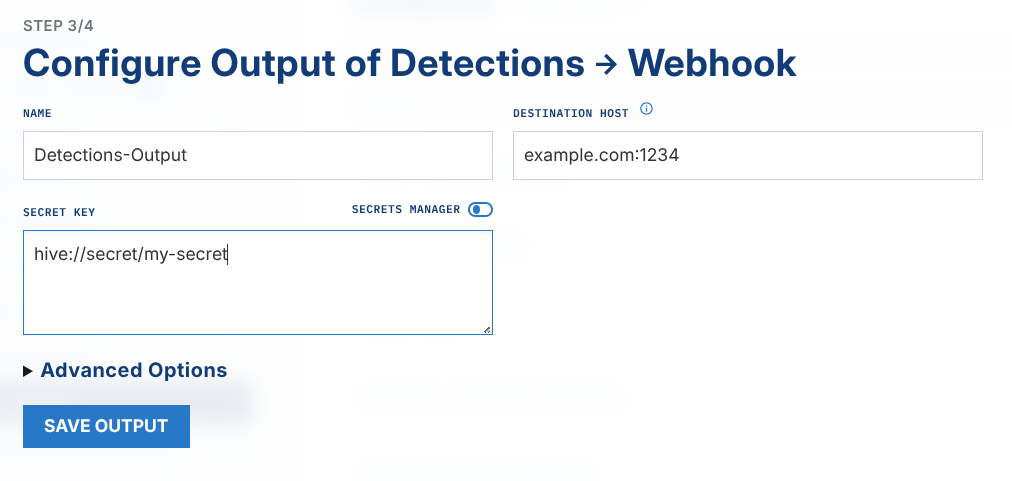
And that's it! The output should start as expected, however when viewing the output's configuration, the secret should refer to the hive ARN, rather than the actual credentials.