SMTP
One option to export data from LimaCharlie is via SMTP, allowing you to send emails directly to a case management inbox or send high-priority detections to an on-call, shared email.
To utilize SMTP output, you will need:
- An SMTP server that utilizes SSL
- Username and password to send through the SMTP server (if applicable)
- A destination email, to receive output
Webapp Configuration
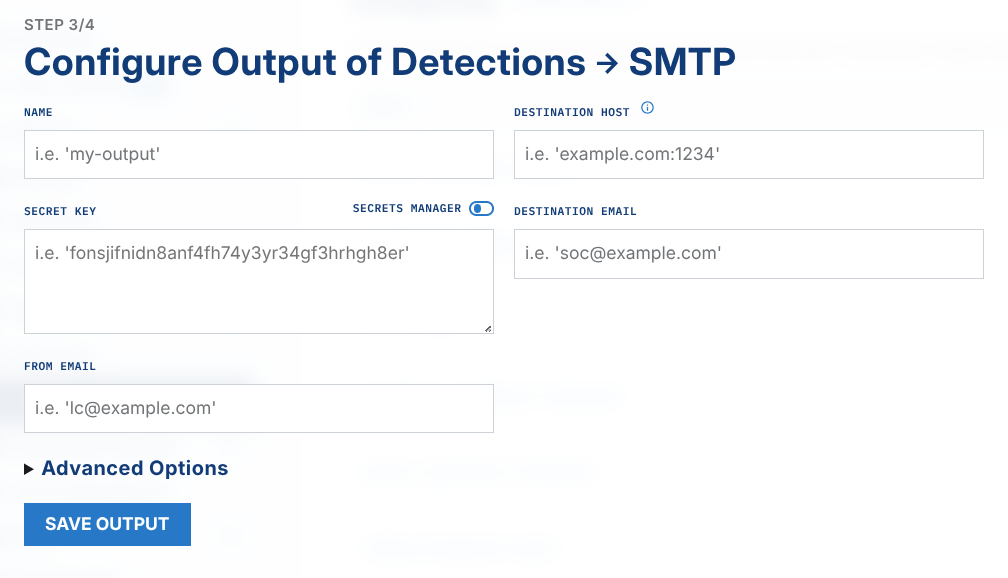
Output individually each event, detection, audit, deployment or log through an email.
dest_host: the IP or DNS (and optionally port) of the SMTP server to use to send the email.dest_email: one or more email addresses to send the email to. Multiple addresses can be provided comma-separated (for examplesoc@corp.com, oncall@corp.com), and display names are supported (for exampleSOC <soc@corp.com>). Every address receives a copy and appears in theTo:header.cc_email: (optional) one or more comma-separated email addresses to add to theCc:header. Each receives a copy.bcc_email: (optional) one or more comma-separated email addresses to copy without exposing them in the message headers (blind copy).from_email: the email address set in the From field.username: the username (if any) used to authenticate to the SMTP server.password: the password (if any) used to authenticate to the SMTP server.secret_key: an arbitrary shared secret used to compute an HMAC (SHA256) signature of the email to verify authenticity. This is a required field. See "Webhook Details" section below.is_readable: if 'true' the email format will be HTML and designed to be readable by a human instead of a machine.is_starttls: if 'true', use the Start TLS method of securing the connection instead of pure SSL.is_authlogin: if 'true', authenticate usingAUTH LOGINinstead ofAUTH PLAIN.subject: is specified, use this as the alternate "subject" line.
Example:
dest_host: smtp.gmail.com
dest_email: soc@corp.com
from_email: lc@corp.com
username: lc
password: password-for-my-lc-email-user
secret_key: this-is-my-secret-shared-key
is_readable: true
is_starttls: false
is_authlogin: false
subject: LC Detection- <Name>
Example sending to multiple recipients with Cc and Bcc:
dest_host: smtp.gmail.com
dest_email: soc@corp.com, oncall@corp.com
cc_email: manager@corp.com
bcc_email: audit@corp.com
from_email: lc@corp.com
secret_key: this-is-my-secret-shared-key
is_readable: true
Note: recipients in
dest_emailandcc_emailappear in the message headers, so they can see each other. Usebcc_emailfor recipients who should receive a copy without being visible to the others. A malformed address in any of these fields will cause the output to fail validation when it is saved.