Git Sync
The Git Sync extension keeps an organization's configuration in a Git repository. It can pull a repository into an organization (apply the configuration in Git) and push an organization into a repository (export what the organization has now). Either can run on a schedule or on demand.
One repository can serve many organizations, and organizations can share files. That makes it the natural way to run an MSSP: write a detection rule once in the repository, and every customer gets it.
For a step-by-step walkthrough, follow the MSSP Git Sync tutorial. This page is the reference.
What Git Sync does:
- Recurring pull. Applies the repository to the organization every hour, 3, 6, 12 or 24 hours, or every week.
- Recurring push. Exports the organization to the repository on the same set of intervals.
- On-demand pull and push. Buttons in the web app, or an extension request from the CLI or API.
- Shared configuration. One repository holds a configuration per organization, and the organizations can include common files.
- Operation log. Each operation, successful or failed, is recorded as an event on the extension's sensor. A failed one is an
apply_failedorexport_failedevent that a D&R rule can alert on.
Git Sync lists the Infrastructure extension as a requirement, so subscribe to both.
Pull and push
Pull: Git to the organization
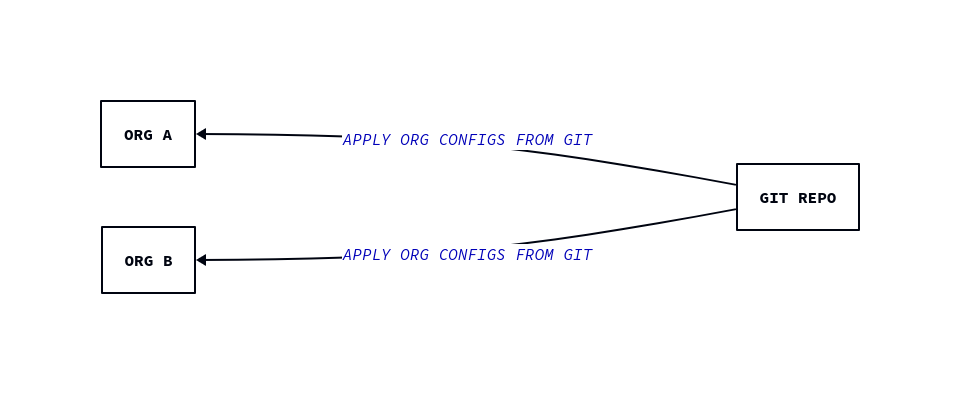
The repository holds a file for each organization. A pull reads it and creates or updates the matching records in the organization.
A pull never deletes
Pull adds new records and updates existing ones. It does not remove a record that is no longer in Git. If you delete a rule from the repository, the rule keeps running in the organization until you delete it there. See Removing things.
Push: the organization to Git
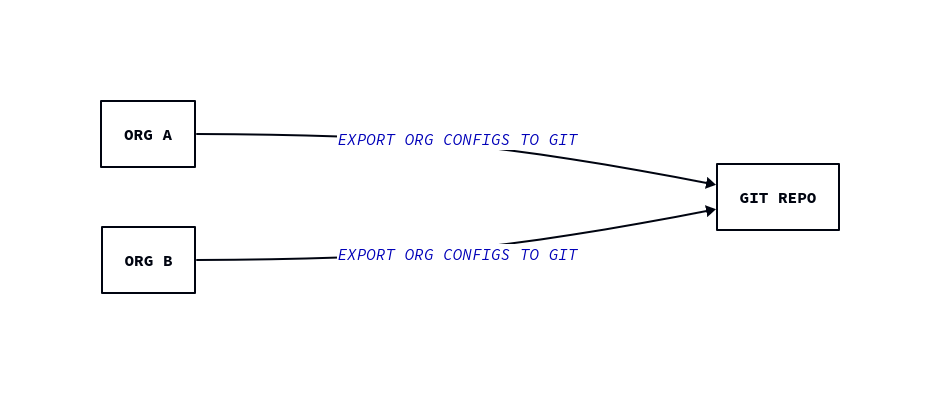
A push writes the organization's current configuration to the repository, under exports/. Use it to bootstrap a repository from an organization you configured by hand, and to record changes someone made in the web app.
A push:
- writes to
exports/orgs/<OID>/and never touchesorgs/, so it cannot overwrite what you pull from; - replaces the whole
exports/orgs/<OID>/folder each time, so records you deleted in the organization disappear from Git; - makes no commit when nothing changed, and otherwise commits as
LC Git Syncdirectly to the configured branch; - works on an empty repository.
If the branch requires pull requests, a push is rejected (protected branch hook declined). Either allow the deploy key to bypass the rule, or leave push off.
What is synced
Git Sync handles these types:
| Type | In the configuration file | Switch |
|---|---|---|
| Outputs | outputs: |
sync_outputs, export_outputs |
| Resources | resources: |
sync_resources, export_resources |
| Extension subscriptions | extensions: |
sync_extensions, export_extensions |
| Organization values | org-value: |
sync_org_values, export_org_values |
| Installation keys | installation_keys: |
sync_installation_keys, export_installation_keys |
| Hive records | hives: <hive>: |
sync_hives.<hive>, export_hives.<hive> |
Detection rules, false-positive rules, lookups, saved queries, YARA rules, AI agents and the settings of extensions such as Exfil, Integrity and Artifact are all hive records: dr-general, fp, lookup, query, yara, ai_agent and extension_config (one record per extension, named after it, for example ext-exfil). The hives you can enable are listed by limacharlie extension schema --name ext-git-sync.
The older top-level sections rules, fps, integrity, exfil, artifact and yara that the limacharlie sync command can write are ignored by Git Sync, without an error. Write them as hives: records.
A few types need care:
secrethive. Offered under Sensitive Data Options. Enabling it exports secret values to Git and lets Git overwrite them. Leave it off, and refer to secrets ashive://secret/<name>.aclhive. Refused. Resource ACL membership stays out of Git.dr-managedhive. Extensions own these rules, including Git Sync's own schedule rules.- Installation keys. The name of each key in the file is its description in the organization, and how a later pull finds it again.
- Outputs and organization values. An export writes them as stored. A credential typed into an output, or an API key stored as an organization value, is written to the repository in clear text. Use
hive://secret/<name>references in outputs and leaveexport_org_valuesoff.
Repository structure
A pull needs this file for each organization:
<OID> is the organization's ID. If the file is missing at the head of the configured branch, the pull fails with organization not found in the repository.
index.yaml lists the other files that make up the configuration:
include:paths are relative to the file that contains them, and included files can include others.- List every file. Wildcards (
hives/*.yaml) are not expanded by Git Sync. Thelimacharlie synccommand does expand them, so a repository that works with the CLI can fail here. - Every file starts with
version: 3. - When two files define the same record, the file included later wins, and an included file wins over the file that includes it.
- A type is applied only when its switch in the Git Sync configuration is on and an included file holds it. A file for a type whose switch is off is skipped silently.
A hive file looks like this. Put enabled: true in each record's usr_mtd, or the record is created disabled:
version: 3
hives:
  dr-general:
    suspicious-encoded-powershell:
      data:
        detect:
          event: NEW_PROCESS
          op: contains
          path: event/COMMAND_LINE
          value: -EncodedCommand
        respond:
          - action: report
            name: suspicious-encoded-powershell
      usr_mtd:
        enabled: true
One organization, all files local
When everything belongs to one organization, keep it in the organization's folder:
.
└── orgs
    └── a326700d-3cd7-49d1-ad08-20b396d8549d
        ├── extensions.yaml
        ├── hives
        │   ├── cloud_sensor.yaml
        │   ├── dr-general.yaml
        │   ├── extension_config.yaml
        │   ├── fp.yaml
        │   ├── lookup.yaml
        │   ├── query.yaml
        │   └── yara.yaml
        ├── index.yaml
        ├── installation_keys.yaml
        ├── org_values.yaml
        ├── outputs.yaml
        └── resources.yaml
version: 3
include:
  - extensions.yaml
  - outputs.yaml
  - resources.yaml
  - org_values.yaml
  - installation_keys.yaml
  - hives/cloud_sensor.yaml
  - hives/dr-general.yaml
  - hives/extension_config.yaml
  - hives/fp.yaml
  - hives/lookup.yaml
  - hives/query.yaml
  - hives/yara.yaml
Sharing configuration across organizations
Put what is common in a shared folder, and have each organization include it:
.
├── global
│   └── hives
│       ├── dr-general.yaml
│       └── yara.yaml
└── orgs
    ├── 7e41e07b-c44c-43a3-b78d-41f34204789d
    │   └── index.yaml
    ├── a326700d-3cd7-49d1-ad08-20b396d8549d
    │   └── index.yaml
    └── cb639126-e0bc-4563-a577-2e559c0610b2
        └── index.yaml
Add an organization's own files after the shared ones, and list them in that organization's index.yaml only.
Export layout
.
└── exports
    └── orgs
        └── a326700d-3cd7-49d1-ad08-20b396d8549d
            ├── extensions.yaml
            ├── hives
            │   ├── dr-general.yaml
            │   ├── extension_config.yaml
            │   ├── fp.yaml
            │   └── query.yaml
            ├── index.yaml
            ├── installation_keys.yaml
            ├── org_values.yaml
            ├── outputs.yaml
            └── resources.yaml
Only the types whose export switch is on get a file, plus an index.yaml that includes them. To manage an organization from Git, copy what you want from exports/ into orgs/<OID>/ or a shared folder. A pull never reads exports/.
Configuration
The configuration is stored in each organization, in the extension_config hive under the key ext-git-sync. Edit it in the web app (Extensions in the sidebar, then Git Sync), or with the CLI:
limacharlie extension config-set --name ext-git-sync --input-file gitsync.yaml --oid <OID>
limacharlie extension config-get --name ext-git-sync --oid <OID>
data:
  repo_url: git@github.com:example/iac.git
  branch: main
  user_name: git
  ssh_key: hive://secret/gitsync-deploy-key
  schedule: 6h
  schedule_export: "-"
  sync_outputs: true
  sync_extensions: true
  sync_hives:
    dr-general: true
    fp: true
usr_mtd:
  enabled: true
The record must be enabled (usr_mtd: {enabled: true}). A disabled or missing record is ignored and requests fail with Git Sync is not configured for this organization, or its configuration is disabled. The web app enables it for you.
| Field | Web app label | Description |
|---|---|---|
repo_url |
Repository URL | SSH URL of the repository, such as git@github.com:example/iac.git. |
branch |
Branch | Branch to pull from and push to. Defaults to main if empty. The web app requires a value. |
user_name |
User Name | SSH user. git on GitHub, GitLab and Bitbucket. |
ssh_key |
SSH Key | Private key. Use hive://secret/<name>. |
schedule |
Pull Schedule | How often to pull. |
schedule_export |
Push Schedule | How often to push. |
sync_outputs, sync_resources, sync_extensions, sync_org_values, sync_installation_keys |
Pull checkboxes | Types a pull applies. |
sync_hives.<hive> |
Pull checkboxes | Hives a pull applies. |
export_outputs, export_resources, export_extensions, export_org_values, export_installation_keys |
Push checkboxes | Types a push writes. |
export_hives.<hive> |
Push checkboxes | Hives a push writes. |
repo_url, ssh_key and user_name accept a hive://secret/<name> reference. Every switch defaults to off, so nothing syncs until you turn it on.
Schedules
schedule and schedule_export take one of - (off), 1h, 3h, 6h, 12h, 24h or 168h. Nothing shorter is available. For a change that cannot wait, run a pull by hand.
Saving the configuration installs or removes the schedule. Git Sync keeps two D&R rules in the organization's dr-managed hive: ext-git-sync-sync for pull and ext-git-sync-export for push. A schedule of - removes the rule. Saving a configuration identical to the stored one writes nothing and leaves the rules as they are.
Subscribing to the extension installs the pull rule at 12 hours, before any configuration exists. Until you save a configuration, each of its runs records an apply_failed event with stage: config (see Seeing the results). Saving a configuration with schedule: "-" removes the rule.
Several organizations pushing to one repository at the same moment can lose the race for the branch (the error says a concurrent push to the same repo can also cause this). The loser tries again on its next run. Prefer scheduling push on one organization, or none.
Running a pull or push by hand
In the web app, open Extensions, then Git Sync. PULL FROM GIT runs a pull and PUSH TO GIT runs a push. They use the saved configuration.
From the CLI or the API, send the extension request apply (pull) or export (push):
limacharlie extension request --name ext-git-sync --action apply --oid <OID>
limacharlie extension request --name ext-git-sync --action export --oid <OID>
Neither takes parameters.
Seeing the results
A pull or push you run by hand returns its outcome to you: a toast in the web app, or the error text from the CLI. A scheduled run has no one waiting for the answer, so every run, successful or not, also records an event on the extension's sensor, the sensor tagged ext:ext-git-sync. In the web app it is the ASSOCIATED SENSOR link on the Git Sync page, then the Timeline.
| Event | Sent when | Fields |
|---|---|---|
apply |
A pull succeeded. | options, changed, unchanged |
export |
A push succeeded. | oid, options |
apply_failed |
A pull failed. | oid, stage, error, branch, options |
export_failed |
A push failed. | oid, stage, error, branch, options |
An apply event has two lists. changed holds the records that were added or updated, and unchanged the ones that already matched. Hive records are named <hive>/<record>. An export event records the options used.
A failure event carries the same error text a caller would get, plus where the run failed. It never contains the SSH key. error is the message, and stage is one of:
stage |
Where it failed |
|---|---|
config |
The configuration is missing, disabled or unreadable. |
lock |
Gave up waiting for another run on the same repository. |
clone |
Reaching the repository: the SSH key, the URL or the branch. |
load |
Pull only. The repository has no orgs/<OID>/index.yaml for this organization. |
sync |
Pull only. Reading the files (a YAML error, a missing include:) or applying them to the organization. |
fetch |
Push only. Reading the organization's configuration. |
generate |
Push only. Writing the files. |
commit, push |
Push only. Committing, then pushing. push is where a read-only deploy key or a protected branch fails. |
notify |
The pull or push worked, but its success event could not be recorded. |
For example, a pull whose index.yaml includes a file that does not exist records:
{
  "event": "apply_failed",
  "oid": "a326700d-3cd7-49d1-ad08-20b396d8549d",
  "stage": "sync",
  "error": "failed to apply configuration: file not found: hives/missing.yaml",
  "branch": "main",
  "options": {"sync_hives": {"dr-general": true}}
}
(options also lists the switches that are off.) List them from the CLI:
SID=$(limacharlie sensor list --selector '"ext:ext-git-sync" in tags' --oid <OID> --output json | jq -r '.[0].sid')
limacharlie event list --sid "$SID" --event-type apply_failed --oid <OID> \
  --start "$(date -d '1 day ago' +%s)" --end "$(date +%s)" --output json
Alerting on failures
Because a failure is an event, a D&R rule can turn it into a detection, and from there into a notification through an output or any response action. This rule reports any failed pull or push of Git Sync:
detect:
  target: edr
  events:
    - apply_failed
    - export_failed
  op: is tagged
  tag: ext:ext-git-sync
respond:
  - action: report
    name: git-sync-failed
The detection carries the whole event, so detect/event/stage and detect/event/error say what failed. To watch only pulls, use event: apply_failed in place of events:.
Before Git Sync is configured, and while its configuration is disabled, the scheduled pull fails with stage: config. To alert only on a configured Git Sync, leave those out:
detect:
  target: edr
  events:
    - apply_failed
    - export_failed
  op: and
  rules:
    - op: is tagged
      tag: ext:ext-git-sync
    - op: is
      not: true
      path: event/stage
      value: config
respond:
  - action: report
    name: git-sync-failed
A failed request is retried by the platform a few times. Retries of one request that fail the same way record one event.
Removing things
Because a pull only adds and updates, remove something in two steps. First remove it from the repository and merge, so the next pull does not put it back. Then delete it in the organization, in the web app or with the CLI:
limacharlie dr delete --key <rule> --confirm --oid <OID>
limacharlie hive delete --hive-name <hive> --key <record> --confirm --oid <OID>
limacharlie output delete --name <output> --confirm --oid <OID>
To make an organization match its files exactly, run limacharlie sync push --force with the same index.yaml and the same types. Force deletes every record of those types that is not in the files, including records created in the web app, so run it with --dry-run first. See the tutorial.
Setting up Git Sync
The tutorial does this for a whole MSSP. For a single organization:
- Create a private repository on any Git host that serves SSH and supports deploy keys.
-
Create an SSH key used only for Git Sync:
-
Add the public key to the repository as a deploy key. On GitHub: Settings, Deploy keys, Add deploy key. Check Allow write access if you will push. A read-only key is enough for pull only. Use one key per repository.
-
Store the private key as a secret. In the web app, Organization Settings, Secrets Manager. Or:
-
Subscribe to Git Sync from the Marketplace, or with the CLI. Git Sync requires Infrastructure, so subscribe to both:
-
Configure it. Open Extensions, then Git Sync. Set the Repository URL, Branch, User Name (
git) and SSH Key (pick the secret), tick the types to push and pull, choose schedules if you want them, and press SAVE SETTINGS. Or useconfig-setas shown above. - Check for literal credentials before the first push. A push writes outputs and extension settings as stored. Follow the audit in Step 6 of the tutorial, or leave outputs and
extension_configoff until you have checked them. - Try it. Press PUSH TO GIT and check that
exports/orgs/<OID>/appears in the repository.
Troubleshooting
Each error below is also the error of the failure event, see Seeing the results.
| Error text | Cause |
|---|---|
Git Sync is not configured for this organization, or its configuration is disabled |
There is no ext-git-sync configuration record, or it is disabled (usr_mtd: {enabled: true} is needed). |
ssh key is required |
The configuration is enabled but has no ssh_key. |
organization not found in the repository: no orgs/<OID>/index.yaml on branch <branch> |
No orgs/<OID>/index.yaml on the configured branch. |
failed to apply configuration: file not found: <path> |
An include: path does not exist, or it is a wildcard. |
failed to apply configuration: yaml: ... |
A YAML syntax error in an included file. |
invalid version found |
An included file has no version: 3. |
failed using secret ssh_key ... RECORD_NOT_FOUND |
The secret named in ssh_key does not exist in the organization. |
ssh: no key found |
ssh_key holds a literal value that is not a private key. |
failed to clone repo: repository not found |
Wrong URL, or the deploy key is not on that repository. |
couldn't find remote ref "refs/heads/<branch>" |
The branch does not exist. |
failed to push (the SSH key needs write access ...): ... marked as read only |
The deploy key has no write access. |
failed to push (...): ... protected branch hook declined |
A push to a branch that requires pull requests. |
requires <permission> |
The extension was subscribed before it needed that permission. Run limacharlie extension rekey --name ext-git-sync --oid <OID>. |
The tutorial's troubleshooting section explains each one.