Config Hive: Lookups
Format
Lookups are dictionaries/maps/key-value-pairs where the key is a string. The lookup can then be queried by various parts of LimaCharlie (like rules). The value component of a lookup must be a dictionary and represents metadata associated with the given key, which will be returned to the rule using the lookup.
Lookup data can be ingested by specifying one of the following root keys indicating the format of the lookupd data:
lookup_data: represented direct as parsed JSON.newline_content: a string where each key is separated by a newline, LimaCharlie will assume the metadata is empty.yaml_content: a string in YAML format that contains a dictionary with the string keys and dictionary metadata like thelookup_data.
Permissions
lookup.getlookup.setlookup.dellookup.get.mtdlookup.set.mtd
Usage
Infrastructure as Code
hives:
    lookup:                             # Example lookup in the lookup hive
        example-lookup:
            data:
                lookup_data:
                    8.8.8.8: {}
                    8.8.4.4: {}
                    1.1.1.1: {}
                optimized_lookup_data:
                    _LC_INDICATORS: null
                    _LC_METADATA: null
            usr_mtd:
                enabled: true
                expiry: 0
                tags:
                    - example-lookup
                comment: ""
    extension_config:                   # Example lookup manager extension config
        ext-lookup-manager:
            data:
                lookup_manager_rules:
                    - arl: ""
                      format: json
                      name: tor
                      predefined: '[https,storage.googleapis.com/lc-lookups-bucket/tor-ips.json]'
                      tags:
                        - tor
                    - arl: ""
                      format: json
                      name: talos
                      predefined: '[https,storage.googleapis.com/lc-lookups-bucket/talos-ip-blacklist.json]'
                      tags:
                        - talos
            usr_mtd:
                enabled: true
                expiry: 0
                tags: []
                comment: ""
Manually in the GUI
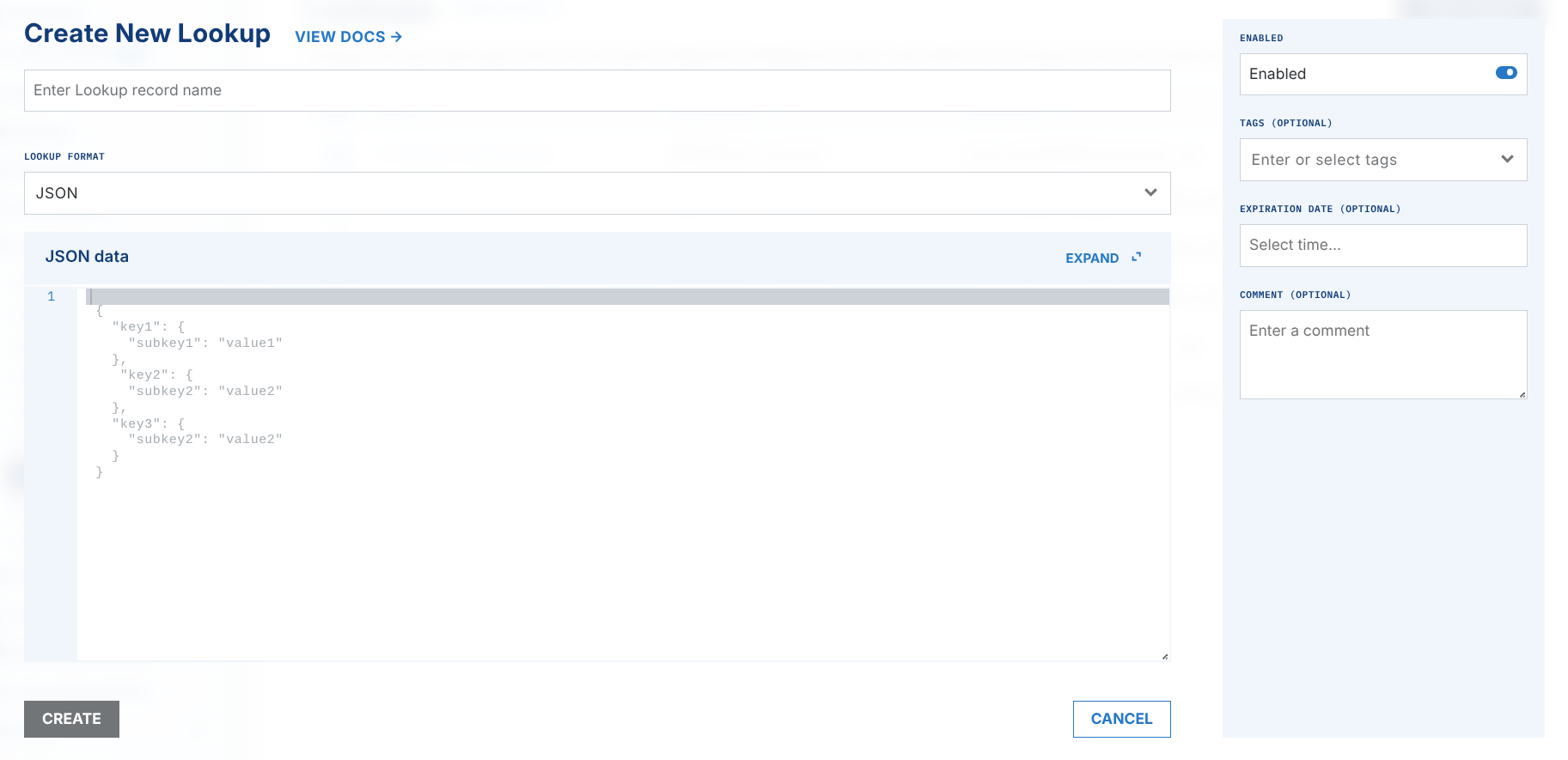
Lookups can be added in the web interface by navigating to Automation → Lookups. Name your lookup, choose the format, and copy paste the contents of your lookup in the JSON data field.
LimaCharlie also provides several publicly available lookups for use in your Organization. More information and the contents of these can be found on GitHub. The contents of these lookups can be used here as well.
Automatically via the Lookup Manager
If your lookups change frequently and you wish to keep them up to date, LimaCharlie offers the lookup manager extension as a mechanism to automatically update your lookups every 24 hours. See the Lookup Manager documentation.
Programmatic Management
Prerequisites
All API and SDK examples require an API key with the appropriate permissions. See API Keys for setup instructions.
List Lookups
from limacharlie.client import Client
from limacharlie.sdk.organization import Organization
from limacharlie.sdk.hive import Hive

client = Client(oid="YOUR_OID", api_key="YOUR_API_KEY")
org = Organization(client)
hive = Hive(org, "lookup")
records = hive.list()
for name, record in records.items():
    print(name, record.data)
package main

import (
    "fmt"
    limacharlie "github.com/refractionPOINT/go-limacharlie/limacharlie"
)

func main() {
    client, _ := limacharlie.NewClient(limacharlie.ClientOptions{
        OID:    "YOUR_OID",
        APIKey: "YOUR_API_KEY",
    }, nil)
    org, _ := limacharlie.NewOrganization(client)
    hc := limacharlie.NewHiveClient(org)

    records, _ := hc.List(limacharlie.HiveArgs{
        HiveName:     "lookup",
        PartitionKey: "YOUR_OID",
    })
    for name, record := range records {
        fmt.Println(name, record.Data)
    }
}
Get a Lookup
package main

import (
    "fmt"
    limacharlie "github.com/refractionPOINT/go-limacharlie/limacharlie"
)

func main() {
    client, _ := limacharlie.NewClient(limacharlie.ClientOptions{
        OID:    "YOUR_OID",
        APIKey: "YOUR_API_KEY",
    }, nil)
    org, _ := limacharlie.NewOrganization(client)
    hc := limacharlie.NewHiveClient(org)

    record, _ := hc.Get(limacharlie.HiveArgs{
        HiveName:     "lookup",
        PartitionKey: "YOUR_OID",
        Key:          "my-lookup",
    })
    fmt.Println(record.Data)
}
Create / Update a Lookup
Lookups support three data formats: lookup_data (key-value pairs), newline_content (newline-separated keys), and yaml_content (YAML string).
Warning
New hive records are created disabled by default — D&R rules that reference the lookup will silently miss every key until you enable it. Each example below explicitly enables the lookup; drop the enabled portion to leave it disabled and enable it later via limacharlie lookup enable --key ….
from limacharlie.client import Client
from limacharlie.sdk.organization import Organization
from limacharlie.sdk.hive import Hive, HiveRecord

client = Client(oid="YOUR_OID", api_key="YOUR_API_KEY")
org = Organization(client)
hive = Hive(org, "lookup")
record = HiveRecord(
    "my-lookup",
    data={
        "lookup_data": {
            "8.8.8.8": {},
            "1.1.1.1": {},
        }
    },
    enabled=True,
)
hive.set(record)
package main

import (
    limacharlie "github.com/refractionPOINT/go-limacharlie/limacharlie"
)

func main() {
    client, _ := limacharlie.NewClient(limacharlie.ClientOptions{
        OID:    "YOUR_OID",
        APIKey: "YOUR_API_KEY",
    }, nil)
    org, _ := limacharlie.NewOrganization(client)
    hc := limacharlie.NewHiveClient(org)

    enabled := true
    hc.Add(limacharlie.HiveArgs{
        HiveName:     "lookup",
        PartitionKey: "YOUR_OID",
        Key:          "my-lookup",
        Data: limacharlie.Dict{
            "lookup_data": map[string]interface{}{
                "8.8.8.8": map[string]interface{}{},
                "1.1.1.1": map[string]interface{}{},
            },
        },
        Enabled: &enabled,
    })
}
Where lookup.json contains:
The --enabled flag creates-and-enables the lookup in one shot. Omit it (and usr_mtd.enabled in the file) to leave the lookup disabled until you call limacharlie lookup enable --key my-lookup.
Delete a Lookup
package main

import (
    limacharlie "github.com/refractionPOINT/go-limacharlie/limacharlie"
)

func main() {
    client, _ := limacharlie.NewClient(limacharlie.ClientOptions{
        OID:    "YOUR_OID",
        APIKey: "YOUR_API_KEY",
    }, nil)
    org, _ := limacharlie.NewOrganization(client)
    hc := limacharlie.NewHiveClient(org)

    hc.Remove(limacharlie.HiveArgs{
        HiveName:     "lookup",
        PartitionKey: "YOUR_OID",
        Key:          "my-lookup",
    })
}
Enable / Disable a Lookup
# 1. Read current metadata to preserve tags, expiry, comment:
CURRENT=$(curl -s -X GET \
  "https://api.limacharlie.io/v1/hive/lookup/YOUR_OID/my-lookup/mtd" \
  -H "Authorization: Bearer $LC_JWT")

# 2. Merge and update (set enabled to false, keep other fields):
curl -s -X POST "https://api.limacharlie.io/v1/hive/lookup/YOUR_OID/my-lookup/mtd" \
  -H "Authorization: Bearer $LC_JWT" \
  -H "Content-Type: application/x-www-form-urlencoded" \
  -d 'usr_mtd={"enabled":false,"expiry":0,"tags":[],"comment":""}'
Warning
The API replaces usr_mtd entirely. Sending only {"enabled":false} will reset tags, expiry, and comment to their defaults. Always read the current metadata first and resend all fields.
hc := limacharlie.NewHiveClient(org)
// Read current metadata first to preserve tags, expiry, comment.
existing, _ := hc.GetMTD(limacharlie.HiveArgs{
    HiveName:     "lookup",
    PartitionKey: org.GetOID(),
    Key:          "my-lookup",
})
enabled := false
hc.Add(limacharlie.HiveArgs{
    HiveName:     "lookup",
    PartitionKey: org.GetOID(),
    Key:          "my-lookup",
    Enabled:      &enabled,
    Tags:         existing.UsrMtd.Tags,
    Expiry:       &existing.UsrMtd.Expiry,
    Comment:      &existing.UsrMtd.Comment,
})
Example Lookup
{
  "lookup_data": {
    "c:\\windows\\system32\\ping.exe": {
      "mtd1": "known_bin",
      "mtd2": 4
    },
    "c:\\windows\\system32\\sysmon.exe": {
      "mtd1": "good_val",
      "mtd2": 10
    }
  }
}
or