SentinelOne
This Adapter allows you to stream SentinelOne activities, threats, and alerts to LimaCharlie via SentinelOne API. It can optionally be scoped to specific SentinelOne sites/accounts (a single tenant of an MSP console) and pull the agent inventory so every endpoint in scope appears as an individual LimaCharlie sensor.
Use this adapter to ingest SentinelOne telemetry into LimaCharlie. To take actions in SentinelOne, such as isolating an endpoint or mitigating a threat, use the SentinelOne extension.
Deployment Configurations
All adapters support the same client_options, which you should always specify if using the binary adapter or creating a webhook adapter. If you use any of the Adapter helpers in the web app, you will not need to specify these values.
client_options.identity.oid: the LimaCharlie Organization ID (OID) this adapter is used with.client_options.identity.installation_key: the LimaCharlie Installation Key this adapter should use to identify with LimaCharlie.client_options.platform: the type of data ingested through this adapter, liketext,json,gcp,carbon_black, etc.client_options.sensor_seed_key: an arbitrary name for this adapter which Sensor IDs (SID) are generated from, see below.
Adapter-specific Options
Adapter Type: sentinel_one
domain- your SentinelOne MGMT endpoint,https://<your-instance>.sentinelone.netapi_key- SentinelOne API tokenstart_time- optional start time to fetch past events.site_ids- optional comma-separated SentinelOne Site IDs. Every request is scoped to these sites (the standardsiteIdsfilter), so an MSP/partner console token pulls in a single tenant instead of every site the token can see. Find a Site ID in the SentinelOne console under Sentinels → Site Info.account_ids- optional comma-separated SentinelOne Account IDs; likesite_idsbut at the account level.collect_agents- optional boolean. Whentrue, the adapter also polls the agent (endpoint) inventory (/web/api/v2.1/agents) and ships oneagentsrecord per agent, re-shipping a record whenever the agent's details change. The first poll walks the full inventory, so the endpoints in scope appear in LimaCharlie as individual sensors right away — even before they produce any threat/alert/activity telemetry. Decommissioned agents are excluded. Off by default. The API token must be allowed to view Endpoints; like any permission problem on a polled endpoint, a403stops the adapter with a visible error rather than silently skipping the feed.agents_poll_interval- optional, how often the agent inventory is re-polled whencollect_agentsis on, as a Go duration in nanoseconds. Default 15 minutes.urls- Advanced, CLI only: a comma-separated list of REST API paths to scrub. Thesite_ids/account_idsscoping applies to custom paths too, so every path listed here must accept the standardsiteIds/accountIdsfilters when scoping is configured. If omitted, by default the adapter brings activities, alerts, and threats:
Endpoints as individual sensors
SentinelOne telemetry is multiplexed into one LimaCharlie sensor per SentinelOne agent: threats, alerts, activities and (with collect_agents) inventory records that carry the same agent id all collapse onto the same per-endpoint sensor, named after the endpoint's hostname. Combined with site_ids, this maps one tenant of a multi-tenant SentinelOne console into a LimaCharlie organization with one sensor per endpoint — the same MSP workflow as the ThreatLocker adapter's Managed Organization ID scoping.
Agent inventory records arrive with the event type s1_agent; threats, alerts and activities arrive as s1_threat, s1_alert and s1_activity.
Deployment Examples
Web App
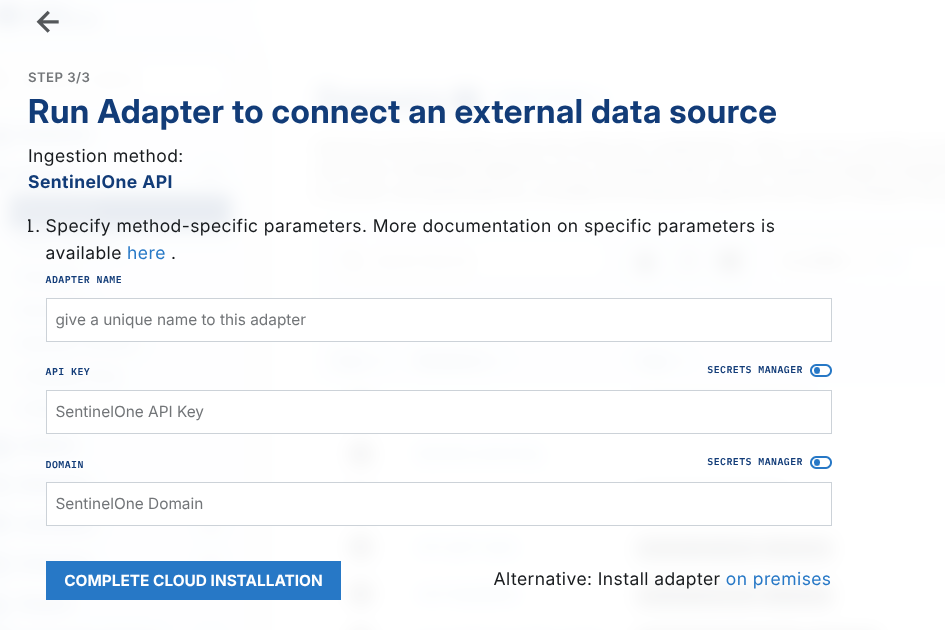
On the Sensors page, Add Sensor, and choose SentinelOne sensor type. Fill out the parameters, and complete the cloud installation.
On-prem deployment
Follow docs Adapter Deployment, download the binaries for your platform, and run the adapter:
./lc_adapter sentinel_one client_options.identity.installation_key=714e1fa5-aaaa-aaaa-aaaa-aaaaaaaaaaaa client_options.identity.oid=aaaaaa-aaaa-aaaa-aaaa-aaaaaaaaaaaa client_options.platform=sentinel_one client_options.hostname=s1 client_options.sensor_seed_key=s1 'domain=https://datacenter.sentinelone.net' "api_key=$S1_API_KEY"