Playbook [LABS]
LimaCharlie LABS
Choosing the Python SDK version
Each playbook runs on either the LimaCharlie Python SDK v4 (the default) or the Python SDK v5. Existing playbooks keep running on v4. See Python SDK version below to opt a playbook into v5.
The Playbook Extension allows you to execute Python playbooks within the context of your Organization in order to automate tasks and customize more complex detections.
The playbooks themselves are managed in the playbook Hive Configurations and can be managed across tenants using the Infrastructure as Code extension.
The execution of a playbook can be triggered through the following means:
- Interactively in the web app by going to the Extensions section for the Playbook extension.
- By issuing an
extension requestaction through a D&R rule. - By issuing an extension request on the API directly: https://api.limacharlie.io/static/swagger/#/Extensions/createExtensionRequest
- By issuing an extension request through the Python CLI/SDK or Golang SDK.
This means playbooks can be issued in a fully automated fashion based on events, detections, audit messages or any other target of D&R rules. But it can also be used in an ad-hoc fashion triggered manually.
Enabling Extension
The Playbook extension can be enabled by subscribing your organization to the ext-playbook add-on.
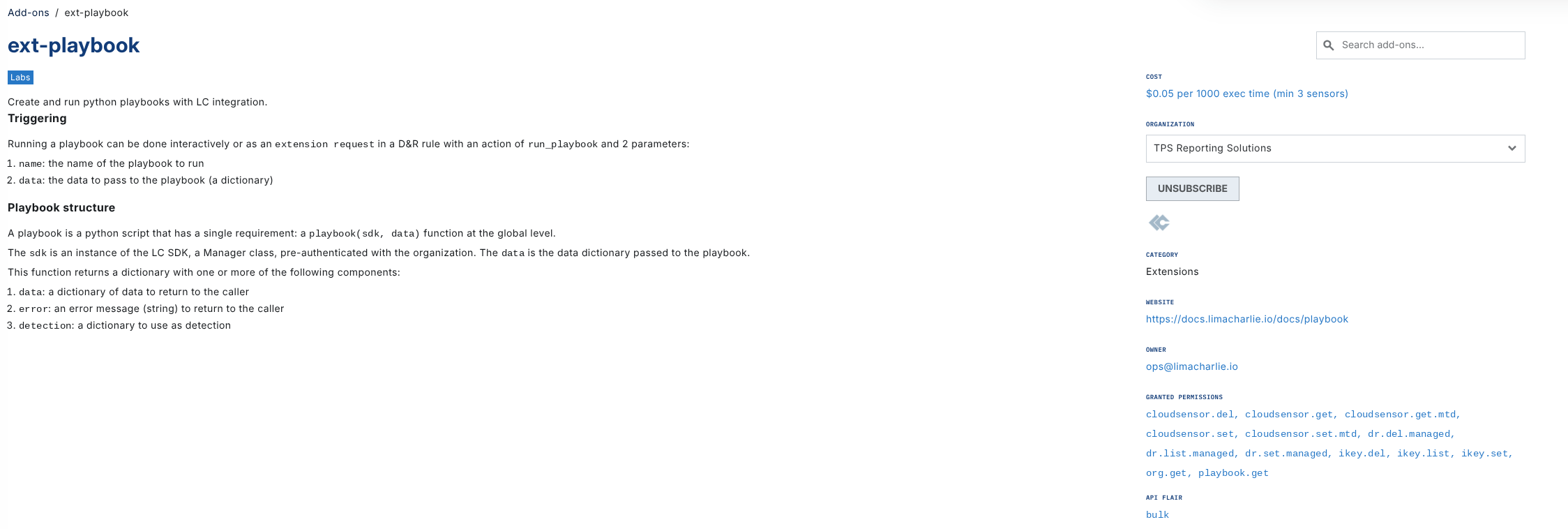
Accessing Playbooks
Playbooks are created, modified, and deleted via the Playbooks option located within the Automation menu.
Note: If you are unable to see the Playbooks option, ensure your user account has the appropriate permissions enabled.

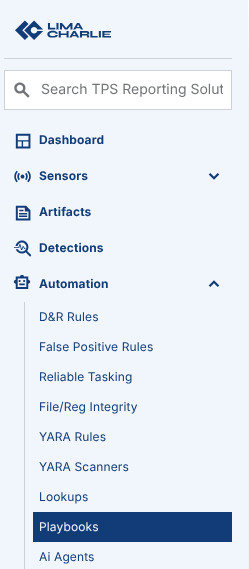
Usage
When invoking a playbook, all you need is the playbook name as defined in Hive. Optionally, a playbook can also receive a JSON dictionary object as parameters, this is useful when triggering a playbook from a D&R rule and you want to pass some context, or when passing context interactively.
D&R rule example
Here is an example D&R rule starting a new invocation of a playbook.
- action: extension request
  extension name: ext-playbook
  extension action: run_playbook
  extension request:
    name: '{{ "my-playbook" }}'
    credentials: '{{ "hive://secret/my-api-key" }}'
    data:
      some: event.FILE_PATH
      for_the: '{{ "running of the playbook" }}'
Python example
Using the Python SDK v5:
from limacharlie.client import Client
from limacharlie.sdk.organization import Organization
from limacharlie.sdk.extensions import Extensions

# Client picks up credentials from the environment or ~/.limacharlie.d/config.yaml.
org = Organization(Client())

# Issue a request to the "ext-playbook" extension.
response = Extensions(org).request("ext-playbook", "run_playbook", {
    "name": "my-playbook",
    "credentials": "hive://secret/my-playbook-api-key",
    "data": {
        "some": "data"
    }
})

# The returned data from the playbook.
print(response)
Using the Python SDK v4:
import limacharlie

# Manager picks up credentials from the environment or ~/.limacharlie.
man = limacharlie.Manager()
ext = limacharlie.Extension(man)

# Issue a request to the "ext-playbook" extension.
response = ext.request("ext-playbook", "run_playbook", {
    "name": "my-playbook",
    "credentials": "hive://secret/my-playbook-api-key",
    "data": {
        "some": "data"
    }
})

# The returned data from the playbook.
print(response)
The SDK used to call a playbook is independent of the SDK the playbook itself runs on.
Playbook structure
A playbook is a normal python script. The only required component is a top level function called playbook which takes 2 arguments:
sdk: an instance of the LC Python SDK, pre-authenticated to the relevant Organization based on the credentials provided, if any,Noneotherwise. With SDK v4 (the default) it is alimacharlie.Manager; with SDK v5 it is alimacharlie.sdk.organization.Organization. See Python SDK version.data: the extension request that started the playbook. The optional JSON dictionary provided as context is indata["data"]; the other keys, such asnameandcredentials, come from the request itself.
The function must return a dictionary with the following optional keys:
data: a dictionary of data to return to the callererror: an error message (string) to return to the callerdetection: a dictionary to use as detectioncat: a string to use as the category of the detection, ifdetectionis specified.
This allows your playbook to return information about its execution, return data, errors or generate a detection. The python print() statement is not currently being returned to the caller or otherwise accessible, so you will want to use the data in order to return information about the execution of your playbook.
Python SDK version
The optional sdk_version field of the playbook record selects the Python SDK the playbook runs on:
sdk_version |
SDK | sdk argument |
|---|---|---|
absent, "" or "4" |
Python SDK v4 | limacharlie.Manager |
"5" |
Python SDK v5 | limacharlie.sdk.organization.Organization |
Any other value is rejected when the playbook is saved. In the web app, choose the version with the Python SDK selector in the playbook editor. Through the API, CLI or Infrastructure as Code, set sdk_version next to python in the record's data (see Infrastructure as Code).
Things to know about SDK v5 playbooks:
- The value returned by
playbook()must be JSON-serializable. - The
is_interactiverequest parameter is only supported with SDK v4. A request withis_interactiveset totruefor a v5 playbook is rejected. - Each v5 execution runs in its own process, and anything the playbook started in the background is stopped when
playbook()returns.
The following v5 playbook reads a secret and counts the Organization's sensors:
from limacharlie.sdk.hive import Hive

def playbook(sdk, data):
  if not sdk:
    return {"error": "LC API key required"}

  # Read a secret from the secret Hive.
  my_secret = Hive(sdk, "secret").get("my-secret-name").data["secret"]

  # Organization.list_sensors() is a v5 generator yielding sensor dicts.
  sensors = [{"sid": s["sid"], "hostname": s.get("hostname")} for s in sdk.list_sensors()]

  return {
    "data": {
      "oid": sdk.oid,
      "sensor_count": len(sensors),
    }
  }
The examples below use SDK v4.
Example playbook
The following is a sample playbook that sends a webhook to an external product with a secret stored in LimaCharlie, and it returns the data as the response from the playbook.
import json
import urllib.request
import limacharlie

def playbook(sdk, data):
  # Get the secret we need from LimaCharlie.
  mySecret = limacharlie.Hive(sdk, "secret").get("my-secret-name").data["secret"]

  # Send the Webhook with the context passed to the playbook (data["data"]),
  # not the whole request, which also holds the credentials.
  request = urllib.request.Request("https://example.com/webhook", data=json.dumps(data.get("data") or {}).encode('utf-8'), headers={
    "Content-Type": "application/json",
    "Authorization": f"Bearer {mySecret}"
  }, method="POST")

  try:
    with urllib.request.urlopen(request) as response:
      response_body = response.read().decode('utf-8')
      # Parse the JSON response
      parsed_response = json.loads(response_body)
  except Exception as e:
    # Some error occured, let the caller/LC know.
    return {
      "error": str(e),
    }

  # Return the data to the caller/LC.
  return {
    "data": parsed_response,
  }
Example playbook with custom detection category
When a playbook generates a detection, you can customize the detection category name that appears in the UI by setting the cat field at the top level of the return dictionary. This is particularly useful when you want detections from different playbooks to have descriptive names instead of the generic "playbook-detection".
The following example reports sensors that have not been seen online in the last hour and creates a detection with a custom category name. It uses the sensors' online status; to alert when a sensor stops sending data, see Alerting on sensors that stop sending data.
import time
from datetime import datetime, timezone

def playbook(sdk, data):
  if not sdk:
    return {"error": "LC API key required"}

  current_time = time.time()
  threshold = 3600  # 1 hour in seconds

  missing_sensors = []
  # Manager.sensors() is a v4 generator yielding Sensor objects.
  for sensor in sdk.sensors():
    info = sensor.getInfo()
    # "alive" is the last time the sensor was seen online, in UTC.
    last_seen = datetime.strptime(info["alive"], "%Y-%m-%d %H:%M:%S").replace(tzinfo=timezone.utc).timestamp()
    if (current_time - last_seen) > threshold:
      missing_sensors.append({
        "sid": sensor.sid,
        "hostname": info.get('hostname', 'unknown')
      })

  if missing_sensors:
    # Return a detection with a custom category name
    # The 'cat' field MUST be at the top level, not inside 'detection'
    return {
      "detection": {
        "summary": f"Found {len(missing_sensors)} sensors missing check-in",
        "missing_sensors": missing_sensors
      },
      "cat": "Server-Sensor-Missing-Check-In"
    }

  # No issues found
  return {
    "data": {"status": "all sensors checked in"}
  }
Important: The cat field must be placed at the top level of the return dictionary, alongside detection, not inside it. When this playbook creates a detection, it will appear in the Detections UI with the category name "Server-Sensor-Missing-Check-In" instead of the default "playbook-detection".
Without cat: Detection appears as "playbook-detection → ext_playbook"
With cat: Detection appears as "Server-Sensor-Missing-Check-In → ext_playbook"
Execution environment
Playbooks contents are cached for short periods of time ( on the order of 10 seconds ) in the cloud.
Playbooks are instantiated on demand and the instance is reused for an undefined amount of time.
Playbook code only executes during the main call to the playbook function, background on-going running is not supported.
The execution environment is provisioned on a per-Organization basis, meaning all your playbooks may execute within the same container, but NEVER on a container used by another Organization.
Although you have access to the local environment, this environment is ephemeral and can be wiped at any moment in between executions so you should take care that your playbook is self contained and doesn't assume pre-existing conditions.
A single execution of a playbook is limited to 10 minutes.
The current execution environment is based on the default libraries provided by the python:slim Dockerhub official container plus the following packages:
- Python
weasyprintflask(SDK v4 playbooks only)gunicorn(SDK v4 playbooks only)limacharlie(LimaCharlie SDK/CLI): v4 for SDK v4 playbooks, v5 for SDK v5 playbookslcextension(LimaCharlie Extension SDK, SDK v4 playbooks only)scikit-learn(Python Machine Learning kit)jinja2markdownpillow- NodeJS
- AI
- Claude Code (
claude) CLI tool - Codex (
codex) CLI tool - Gemini CLI (
gemini) CLI tool
Custom packages and execution environment tweaks are not available in self-serve mode, but they may be available on demand, get in touch with us at support@limacharlie.io.
Infrastructure as Code
Example:
hives:
    playbook:
        my-playbook:
            data:
                python: |-
                    def playbook(sdk, data):
                        if not sdk:
                            return {"error": "LC API key required to list sensors"}
                        return {
                            "data": {
                                "sensors": [s.getInfo() for s in sdk.sensors()]
                            }
                        }
            usr_mtd:
                enabled: true
                expiry: 0
                tags: []
                comment: ""
To run a playbook on the Python SDK v5, add sdk_version: "5" to its data:
hives:
    playbook:
        my-v5-playbook:
            data:
                sdk_version: "5"
                python: |-
                    def playbook(sdk, data):
                        if not sdk:
                            return {"error": "LC API key required to list sensors"}
                        return {
                            "data": {
                                "sensors": list(sdk.list_sensors())
                            }
                        }
            usr_mtd:
                enabled: true
                expiry: 0
                tags: []
                comment: ""
Billing
Playbooks are billed per seconds of total execution time.